This post contains affiliate links, which means I will make a small commission, at no cost to you, if you make a purchase through a link. I only recommend products I use and love.
There’s no doubt that most people have cottoned on to the idea that Pinterest can be a major source of traffic, Tailwind tribes even more so. A lot of people I come in contact with through my free Facebook Group have only scratched the surface of what could be possible with Pinterest and generating traffic. Every time I do any training which mentions Pinterest, such as my live training workshop, I get loads of questions about Tailwind Tribes. Often people have no clue what they even are and many don’t understand how they work. So I thought today I would give you a breakdown and show you how you can increase your traffic by using them.
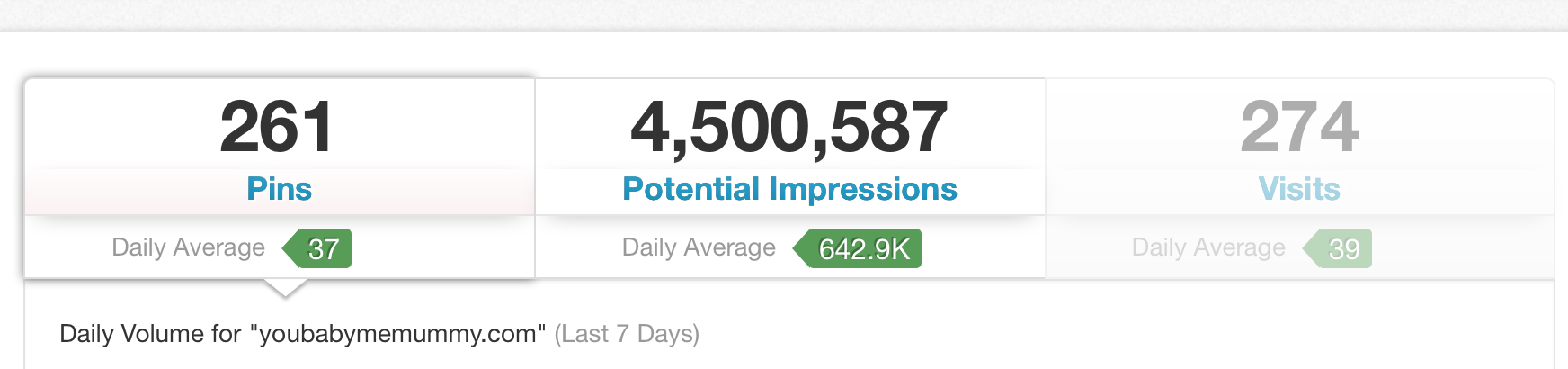
Pinterest as a source of traffic.
First and foremost Pinterest is a search engine as opposed to a purely a social media platform. So the power it has to increase our traffic should not be underestimated.
For so long Twitter was my largest traffic referee as I have around 5 times the number of followers on Twitter than I have on Pinterest. However, over the last few months, and since utilising tribes Pinterest is now the biggest driver of traffic to my blog. Thanks Tailwind tribes!

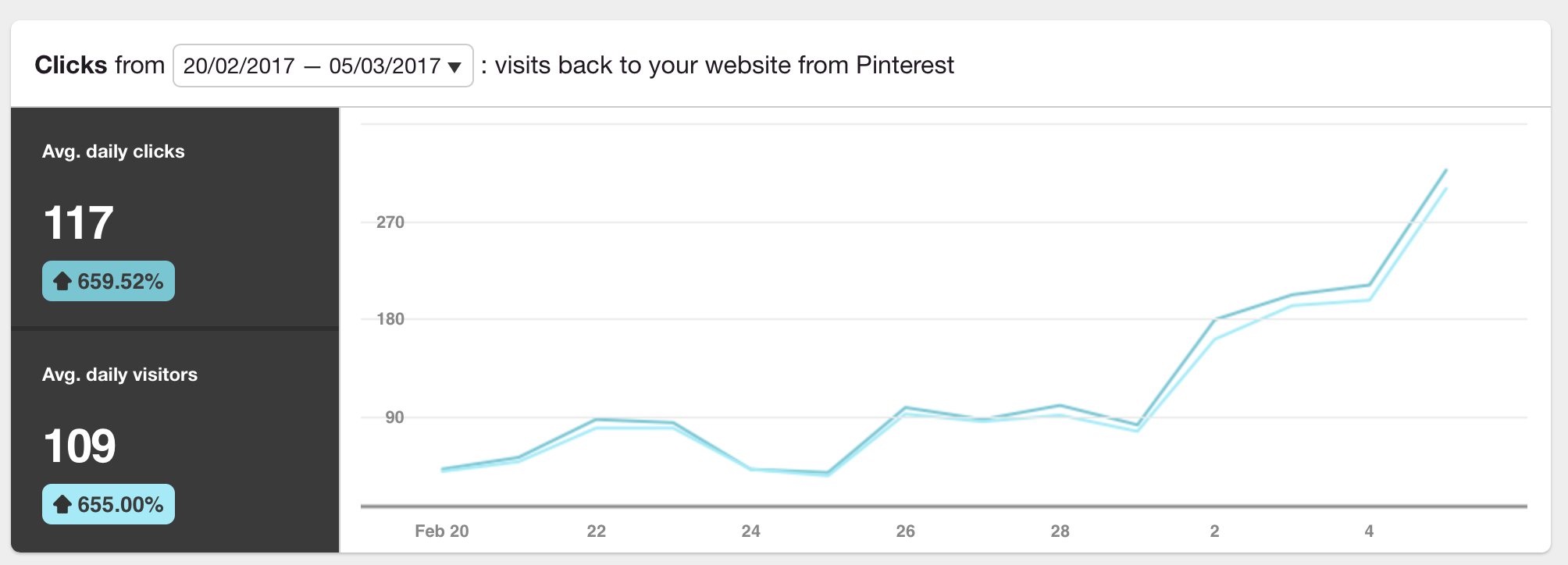
You can see clearly the point that I started using tribes!
These are my personal results, but Tailwind also publishes the Typical Results of Tailwind for Pinterest Members every year, so you can see exactly what the average growth rate looks like for their members.
So what is Tailwind?
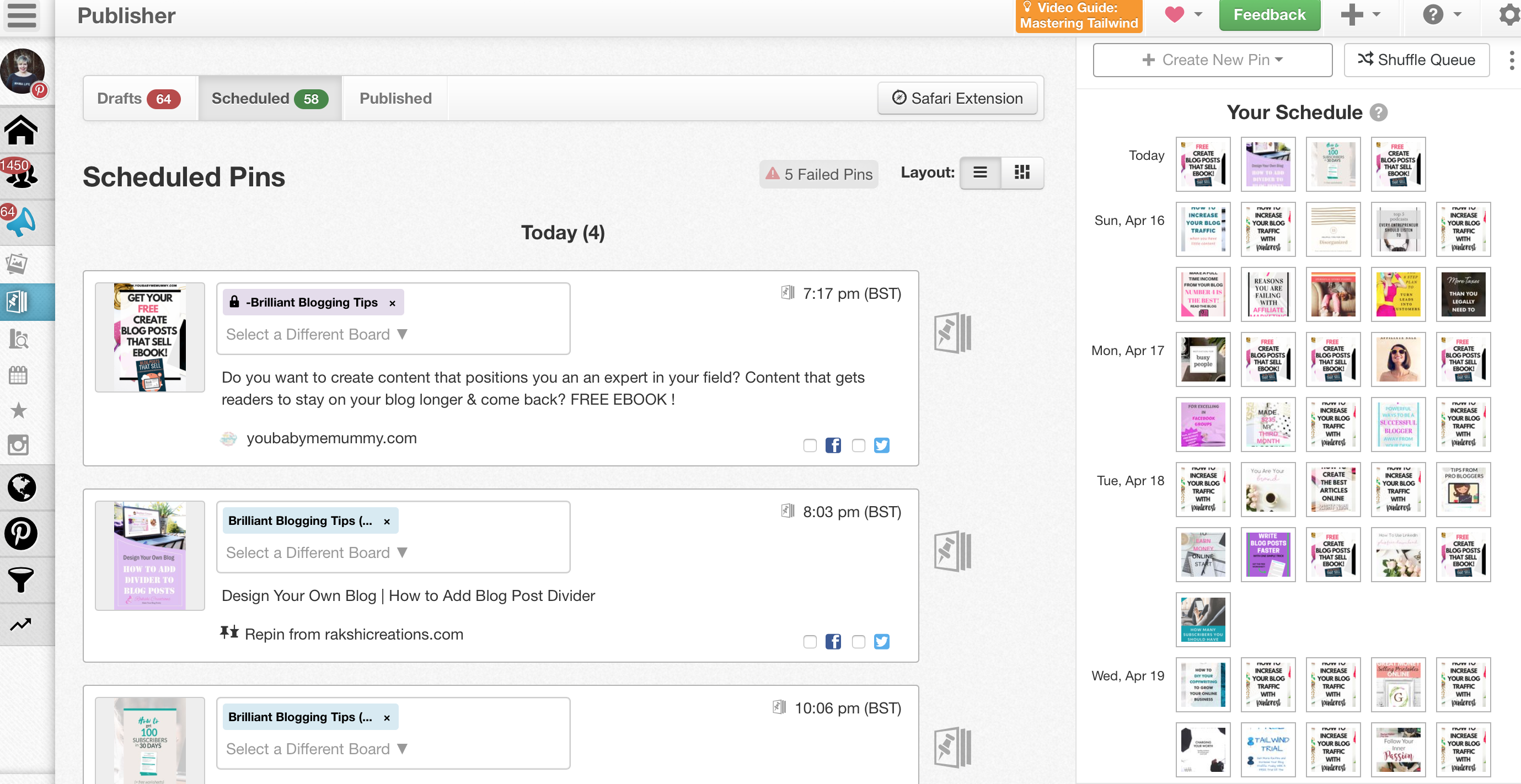
Tailwind is a Pinterest scheduling tool which works like most other social media schedulers, meaning you can have a presence and pin content sound the clock without doing it manually. You can schedule your own pins or those of others quickly and easily. Tailwind allows me to spend less time balancing the times I pin so that I don’t flood my followers feed. I can sit down and schedule a bunch of stuff from my Pinterest account and Tailwind drips this out.
You can set your schedule with timings to suit you. Tailwind also recommends time slots for you.

Then you can start filling up your schedule with your own pins and those of others.
Benefits of Tailwind
So not only does it do the scheduling, but by giving me this consistent presence my followers have increased (along with my traffic which I’ll come onto later!).
My Pinterest followers used to grow quite slowly, however now my following grows by between 100-200 followers a week.

What’s the deal with Tailwind Tribes
Tailwind Tribes are a feature which can make a huge difference to your traffic. A Tailwind Tribe is basically a group of likeminded winners who all pin each others content. This combined following can mean massive exposure for your pins/content and a huge boost in traffic. Tailwind Tribes are similar to a group boards on Pinterest, but they are housed in Tailwind rather than in Pinterest.
Just like Pinterest group boards, each Tribe administrator sets specific rules that you are to follow or you be removed from the group. Often these rules are along the lines of you must pin one or two from other people in return for adding one of your own pin to the Tribe. Tribes are a free feature, so you don’t need a paid Tailwind account.
Boost community with Pinterest Cheatsheet
If you want to join my mailing list and get access to my epic Blogger’s Resource vault of cheatsheets and downloads (INLCUDING THE PINTEREST CHEATSHEET) as a welcome gift, you can do that here.
So how do Tailwind Tribes work?
The main difference between group board and Tribes is that when you’re pinning pins from the Tribes you schedule them to your boards via Tailwind’s scheduler, which is really easy to use. Tailwind cleverly keeps track of all of your reshares, repins, and reach for each Tribe, which will be useful for you to assess which Tribes are doing well for you.
How do I join a Tailwind Tribe?
You can use the Find a Tribe feature and request to join as many Tribes as you like and maybe even create your own if you fancy it?! (check the bottom of this post as I have some invitations for you to Tailwind Tribes).
- When you’re in a Tribe you can then pin your content to the tribe and repin that of others.
- All of the bloggers and business people in your tribe are keen to schedule your beautiful pins to their queue. So if you produce quality pins, people in your tribes will be keen to repin them.
- Keep up your side of the bargain – as I mentioned earlier you enter into an agreement to pin X number in return for adding one of your own pins. So make sure you do this. I just add my pins then go back through each tribe I have added to and schedule X number of pins from each Tribe, so I never forget.
Tribes to join
- Bloggers Killin It on Pinterest
- All Things Beautiful
- Best Bloggers Pins
- Striving Bloggers
- Blogging Friends Pins
- Pinterest Friends
- Blogging Resources
- Blogging Tips
- Bloggers Chalkboard
- Practical Mommy Lifestyle
- Mom’s The Word
- Everything Baby
- Special Needs Parenting
- Travel Pinspiration
- All Things Crafty
- DIY Bloggers
- Favourite Food Bloggers
- Get Organized!
- Easy & Healthier Recipes
- Mmmm Recipes
- 300+ Repins – Popular DIY, Crafts, Home, & Recipes
- Fabulous Food Pinners
- Planning, Bullet Journaling, and Organization
- Home Design & DIY
- Mom+Tot+Blog Tribe
Boost community with Pinterest Cheatsheet
If you want to join my mailing list and get access to my epic Blogger’s Resource vault of cheatsheets and downloads (INLCUDING THE PINTEREST CHEATSHEET) as a welcome gift, you can do that here.
Navigating the Tailwind Tribes dashboard
Once you get accepted into a Tribe you will see a dashboard similar to the image below. On the top left you can use the drop down to navigate between your Tribes. You can use the tabs across the top to see all the new pins in that Tribes, your own pins in that Tribe and those you’ve shared.

Then down the left side you can see al the other members of the Tribe and the number of pins they have added. You also get stats on the repins and reach you have gained from that Tribe.
Then, you can scan through the pins in each Tribe. When you find one you wish to pin, you simply select your chosen board to pin to and click add. This then drops the pin into the next slot on your Tailwind schedule.
Tips for Tailwind Tribe success?
- Add a good description to each pin with fab SEO keywords (3-4 sentences long).
- Stick to the rules.
- Don’t dump your pins, without repinning.
- Pin quality pins which fit with your Pinterest aesthetic.
- Regularly make time for your Tribes.
As you can see the potential for traffic growth from using Tailwind, and specifically from Tailwind Tribes, is huge! Have fun!
Boost community with Pinterest Guide
If you want to join my mailing list and get access to my epic Blogger’s Resource vault of cheatsheets and downloads (INCLUDING THE PINTEREST GUIDE) as a welcome gift, you can do that here.