
I love PicMonkey and I use it every day, in every blog post I write. I have been asked a few times how I have created a few of my pictures. So I thought I would share a few tricks with you all.

PicMonkey
1. Spot colour on a black & white photo
-

PicMonkey
The first thing you have to do is make the picture black and white.
- Then click on the paintbrush icon. Hover over your image and see how big the brush is compare the the area you wish to change back to colour. If you need a different size brush, just change the size. Then you are ready to start erasing the black and white.
- Go to the image, it might help to focus in on the area you want to change. Look in the bottom right hand corner of your screen and increase the percentage. This will make it easier to see what you are rubbing out. If you make a mistake, click the paintbrush again and it will fill in what you have just erased.
- Change the % back so you can see your whole image and there you have it, a black and white image with spot colour.

PicMonkey
2. Erasing things from photos
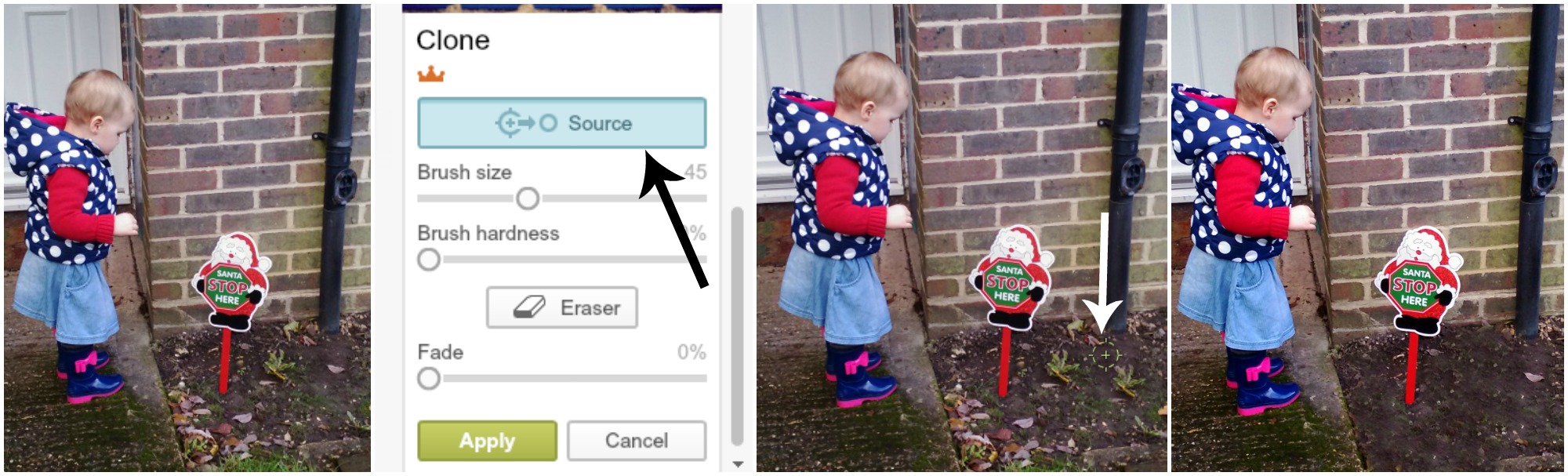
We have all done it, taken a really great picture then noticed something undesirable in the shot that is difficult to cut out. Here is where the Clone tool comes in so useful.
PicMonkey
- Select the Clone tool (the last option in the effects menu) under Advanced.
- Check the brush size you need by hovering over the image.
- Click source & then take your circular brush to an area you want to superimpose on the duff section (you can see this green circle just under my white arrow). Click to select this ‘good’ area.
- Then click on the area you wish to remove.
- Repeat clicking the source and dropping it on the area you want to change.
- Click Apply and my weeds disappear!
3. Colour matching
- Click Edit and upload the image that you want to match from (your desired colour).
- Go to Overlays (Butterfly)
- Add any shape
- Click on Colour 2 then click the pipette icon.
- Drag the pipette to the colour your desired colour. The shape will change colour.
- Click on Colour 2 again and you will now see the HEX code for that shade to the left of the pipette.
- Copy and paste it somewhere safe.
- Repeat the process for all the colours you want to match to.
- Then when you need a shade, just paste the HEX code into the box and the colour match will appear.

PicMonkey
4. Making a picture circular
- Open the picture that you want to edit.
- Crop the picture, a true square will give you a better circle.
- Then select Frames and look for a frame that you like and that gives you an option for corner radius.
- Increase the radius as far as it will go.
- Tick the box for transparent corners.
- Save your new round image!

PicMonkey
5. Curving words
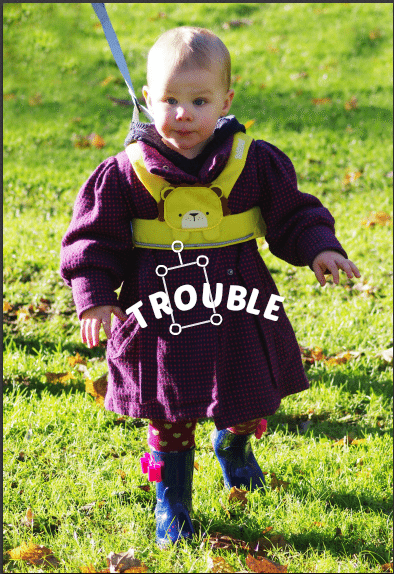
Curving words is not very technical, but it might be something that is not immediately obvious. Photoshop curves the whole word for you, and so you might spend time looking for a function to do that on PicMonkey (there isn’t one). However, this doesn’t mean you can’t curve words.
- Go to Edit and load the image you would like your text on.
- Select the text option and click. It will launch the box to type in.
- Type the first letter of your word only. Resize the box snugly around your letter.
- Then repeat opening a next text box and popping in one letter at a time.
- When you click on a letter you will see a circle on a line coming out of the top pf the box. Use this to change the angle of each letter to create a curved word.
- Save!
PicMonkey
6. Lighten & Brighten
I do this to almost all of my photos. Especially the ones we take indoors, as the natural light in our house is very poor.
- To Lighten open the image, then click the little wand (effects).
- Scroll down to last section and click on Curves.
- You will see a diagonal line, click on it and drag it toward the top left (a bit at a time) to see how it lightens your image.
- If your picture goes a bit yellowy increase the colour overide.
- Click Apply when you are happy.
- To Brighten in the same menu there is a Boost option.
- Select and increase the colour until you are happy.
- Click Apply and save your new light/bright image.
7. Removing the background
This can be quite time consuming, but it can be quite a useful thing to do.
- Open a blank Design.
- Then select Overlay.
- Choose Your Own and pick the image you want to remove the background from.
- Drag the edges out to enlarge, then click eraser on the overlay box.
- Increase eraser size and then start rubbing out the background.
- Vary the size of the image and the brush to get right into all the edges.
- When you are happy go to the square option right at the top of the main menu.
- Open Canvas and click make canvas transparent.
- Then you can use this image as an overlay on a new image.
- Just open the image (in Edit a picture), select overlay, your own, pick it and move it to an appropriate place on your new canvas.
I used this technique on our recent Mark Warner post.

PicMonkey
Do you use PicMonkey or do you prefer another piece of software?

Blog Club

The Mad Mid Week Blog Hop

Brilliant blog posts