

How To Use Google Keyword Research Tool: A Step-by-Step Guide
There’s always a new app or a tool that someone somewhere is recommending. So many of these potential assets to your blog are available to buy and some are absolutely free. One of the most helpful free tools is the Google Keyword Research Tool.

Why do you need to use the Google Keyword Research Tool?
When people pop words into a search engine to find what they are looking for. These words and phrases are keywords. As you can imagine people put in lots of different words, making some words/phrases more popular than others.
The Google Keyword Research Tool can be used to help you find the right keywords for your blog post. The right keywords will help you get found in search. So if you are writing about baking a Christmas cake, you need to know the best keywords (i.e. the ones people are using in their searches). about making christmas cakes to weave into your post. See how important it is!
Step-By-Step Guide For Google Keyword Research Tool
-
Get a Google account
If you already use Google+, Gmail or any other Google platform you will already have an account. If not, you just need to go to Google Adwords site and set up an account.
2. Log in to the Google Keyword Research Tool
Use your Google password to log into the Google Keyword Research Tool. Don’t be alarmed! There are lots of options, some which you can pay for, e.g running adverts. What we are looking for is the “search for new keywords using a phrase, website or category” section.
Next head to “Find new keywords” section put in the search box the topic of your post, so the Keyword Research Tool can find great keywords for that particular post.
3. Searching for Keywords
There are three ways to search for keywords with the research tool.
- Category: Probably not the most widely used methods, you could try it out and see what you get.
- Service or Product: Enter a word or more to describe the topic of your post. Make sure you put each one on a separate line. Think of specific terms, don’t go too general, as this also means more competition.
- Blog homepage: Entering a URL into this box will allow the Keyword Research Tool to analyse this page and recommend keywords based on that page. You may also want to pop in another url to see which keywords peers are using on their blogs.

4. Filter Your Options
It’s possible to analyse your keywords further still.
Targeting: There are further options under targeting.
xx
Location: Are you promoting something location specific? If so, then you might want to switch the worldwide option to a more narrowed, local area. Local people to you might use different keywords to describe the product or service than people world wide. So you want to use the local words to target these local people if relevant to your product/service/post.
Negative Keywords This is used as part of is where you’ll enter any words that you do not want to be included in your search results.
Customize your Search: As a blogger using this as a free tool you only need to focus on one aspect of this section. The Keyword Filters option. This gives you the option of filtering out keywords that have less than a set number of searches per month. Less than (<) 12000 searches a month would be a good place to start. Going too high means you could reach more people, but you will also have much more competition.

5. Find Keywords
When you’re happy with all the fields click on the “Get Ideas” button, you’ll be taken to the results page.
Look for “Keyword ideas” and you will be shown a list of keyword options, in order of relevance to your search.
Here you can sort by the average monthly searches. So, for example, a search term for Christmas cards might have a high number, but all gained in December. Therefore, not a good keyword to use in April. The graph icon breaks the searches down to shows how they are spread out or perhaps if a term is losing popularity as time goes on.
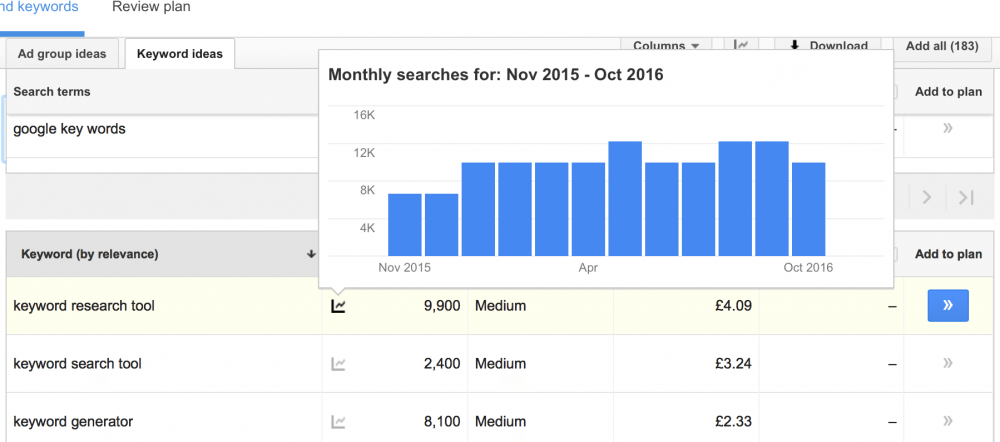
You can get an idea of how valuable keywords are by looking at the Competition information. This shows how much money advertisers are willing to spend on trying to secure those specific keywords. Suggested bid is a similar thing. The higher bid the more valuable those terms are considered to be, as it will do well on searches and bring in more traffic.
What is the ideal?
You should be looking for keywords that offer a high volume of searches without too much competition.
Do you use the keyword research tool? Will you start using it now?
Comments 14
This is really helpful. I will check it out right now while I’m not using it yet. But for the growth of my blog, this is the next step. If I understand correctly, this tool is free?
#TheList
I’ve not done this before. Thanks for the fab how-to as always. This is my weekend activity I think! #thelist
Oooooh Ill definitely be giving this a go tomorrow night when Ive got the place to myself! Thank you for the insight! Film, beverage, snacks and Google Keywords… so rock and roll <3 #thelist
Somebody mentioned this to me last week and I’d never heard of it. I’m so glad I now have a guide to help me understand it better. Thanks! #TheListLinky
I sort of knew about this but filed it under ‘101 things i need to learn when i’ve got everything else sorted out in my life’. Will bookmark for sure and read it under duvet after DH soundly asleep. Thank you I love blogging info #TheList
Thank you for this info, it wasn’t something I was aware of at all. I mean, I knew about keywords, but not about how to use the keyword search. So much still to learn!! #TheListLinky
wow I had absoloutly no idea about this, I will have to take a look!
This looks super useful. I’ll be pinning and coming back when I’m on a organizing mission! #TheList
More great tips, you are fabulous!! #TheList
Super helpful post!!
Lx
http://workingmumy.blogspot.com
#TheList
I used to use this but haven’t for ages – thanks for reminding me! #thelistlinky
Thank you for the lead – I can’t believe I’ve been online for 12 years with my cards and never did this! No wonder I’m down at the bottom!
Pingback: Social media content curation made easy | Posicionarnos
Nice post. Very useful tips for the keywords research tool.