
This post contains affiliate links, which means I will make a commission at no extra cost to you should you click through and make a purchase.
Pinterest gives you the power to attract targeted traffic to your site. With over 300 million people using the platform each month.
You might have caught wind of the chatter from the Pinterest world recently about ‘fresh content’.
All platforms want creators to follow their rules and use their platforms as they were intended to be used. Pinterest is no different.
So what do the new Pinterest guidelines mean for you as a creator?
Don’t panic only one aspect of your pinning needs to change.
Pinterest wants everyone to create and save more fresh pins.
What counts as a ‘Fresh Pin’?
Pinterest is encouraging fresh, high-quality content. This means a new image that’s not been shared to Pinterest before. This includes new images for existing posts, products, and pages, images for new pages, new blog posts, new product listings. The Pin can link to a product listing, blog post, or a page on your website that already has Pins linking to that url; as long as it’s a new image it counts as fresh content.
They want to encourage Pinners to engage with the platform, saving and clicking pins.
So there’s no mystery, just create new pages, new product listings, new blog posts, and create new images for existing relevant content that’s high quality enough to encourage saves and clicks.
The Pinterest algorithm is already prioritising fresh content, but this will become more marked in the upcoming months.
Ideally, you’ll create at least a few new pieces of content to save to Pinterest every single week. Pinterest wants to keep the platform fresh and exciting for users, and to that end, they’re favoring content Creators who regularly contribute great fresh content. Let’s dive into how to increase Pinterest traffic to your website.
Step by step to increase Pinterest traffic
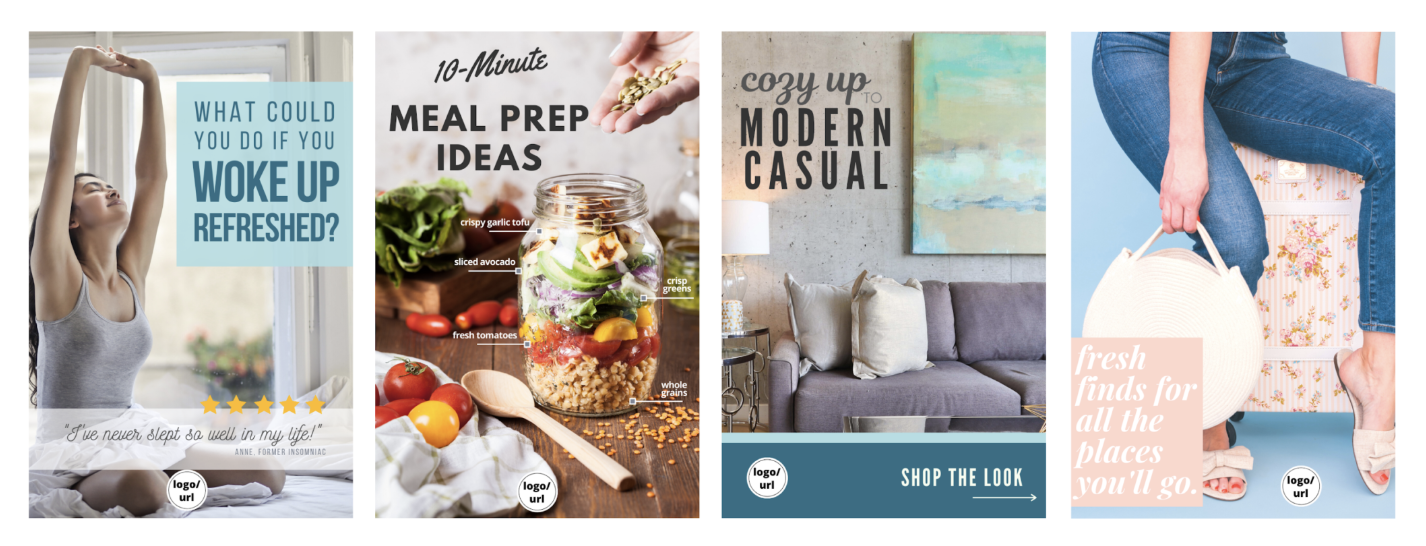
- Create a new pin image in a tool like Canva. Make sure it has text on it to encourage people to click/save. Also, add your URL to the image.
- Upload it to Pinterest and add a link to a URL. This could either be a blog post or product page. Boom! You have a Fresh pin.
- Pin this fresh pin to 10 different boards on your account. Pinning to the most relevant board first.
- Spread out the saves to each of these boards – two or three days in between saves to the same board, but testing this on your account will be key.
- Repeat the process with a new pinnable image, you can link it to the same URL and save it to the same boards. A new image means it’s still classed as a fresh pin.
- Make multiple pinnable images for each blog post, page or product. Each linked image will be classed as a fresh pin. You can then pin each to the same 10 boards as before.
Use templates to make the creation easier
The easiest way to create all these fresh pins for each post, page or product, is to create various pin templates. This will make it much quicker.
Remember, each one is a fresh pin, even if it links to the same URL.
Use a different layout, text placements and add new images every time you publish a new post, page or product.

FAQ: Increase Pinterest traffic
Do we need to update the title and description, as well as the image?
Try different titles and descriptions to see what works best and then use analytics to verify this. Look into trends and think more carefully about how you want to position your content to capitalize on search behaviors or seasonal moments.
As you are making new images, it’s likely that you’ll emphasize certain aspects of your product or service more in some images than in others, so naturally, you’ll want to change the title and description. However, the “fresh” part of the content is the new image itself.
Keep in mind that titles and descriptions that don’t accurately reflect an image or landing page experience are less valuable to Pinners and will not perform as well on the platform.
Can I just rewrite the Pin description, title and change the hashtags? Is that “fresh”?
It’s ok to test new approaches to copywriting this way, but that alone would not qualify as “fresh.”
How different does an image have to be, to be classed as “fresh”?
If you’re making changes you might as well create an entirely new and fresh image. Trying to game the system is not what this is about. It’s about high-quality fresh content. So do your best to try to create just that.
Changing the focus on the title, the text layout, the image or angle of the image, so each image will appeal to a different pinner.

Is fresh content doing better?
Pinterest has stated that their algorithm values recency (freshness) and relevance as key factors.
So the more recent and relevant the content is the better it will be distributed in the Home Feed and Search results when compared to less relevant or stale content.
Can you share the same Pin image again?
Duplicate content will be distributed less when compared to fresher content. Accounts that share too much duplicate content could possibly see penalties or suspension.
How much duplicate content is “too much”?
There are no exact guidelines. However, approved partner Tailwind has introduced a new feature called SmartGuide that was developed using the latest recommendations from Pinterest.
SmartGuide monitors your Pinning volume and will alert you if you need to adjust your pinning schedule. If you’re publishing a healthy volume of Pins you’ll see the SmartGuide “All Clear” badge is green.
What if my duplicate Pins are still bringing in traffic?
That’s fine, however, you’ll be maximising your reach by focusing your time on creating more fresh relevant content.
2020 Pinterest image best practices
When it comes to Pinterest, not just any old image will do! Some suggestions to increase engagement and traffic include:
- Use clear, well-lit, professional-looking photos.
- Crop images to a 2:3 ratio (1000x1500px or equivalent). Longer images take up more room in the feed and the text on those images will be easier to read.
- Include a call to action on the Pin (“Click here,” “discover how to save,” etc.)
- Put your product or service front and center in the picture.
- Try including a person or pet for a personal touch. It helps to show your product in use.
- Lean in to every day and seasonal moments. Help people see how your product fits into their lives.
- Give extra context with the text on the image.
- Add your logo to build trust and awareness.
- Inspire with something new, but make sure it feels attainable.
- Highlight the benefits of your product or brand.
- Design for mobile viewers (make sure text isn’t too small).
That’s the lowdown on how to increase Pinterest traffic in 2020 and stay on the right side of the algorithm. Have you noticed a change in your Pinterest traffic?
Disclosure: This post contains affiliate links, which means I will make a commission at no extra cost to you should you click through and make a purchase.

Check out: How to create a Pinterest pin template